Orbit Work Orders Example
This example demonstrates how to use a Flask web service to create and read GitHub issues as work orders. Orbit can support working with Github directly, but this example uses a middleman service to illustrate how such an integration could be built.
See the Orbit Documentation for more information on how Orbit handles work orders.
Setup Dependencies
See the requirements.txt file for a list of Python dependencies. Install them with:
pip install -r requirements.txt
Environment Variables
Before running, set the following environment variables:
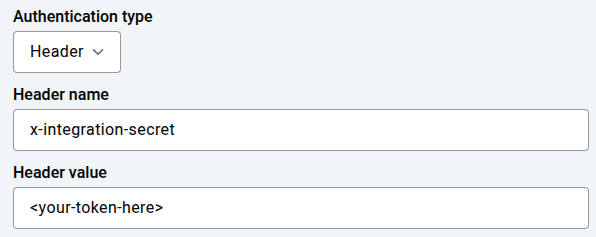
INTEGRATION_SECRET: Secret for authenticating API requests with the middleman service. This should match the value set in Orbit’s work order integration configuration.GITHUB_TOKEN: GitHub personal access token (with repo/issues access). Please see authenticating with a personal access token for more information.GITHUB_REPO: GitHub repository in the format{owner}/{repo}
Configuring Orbit
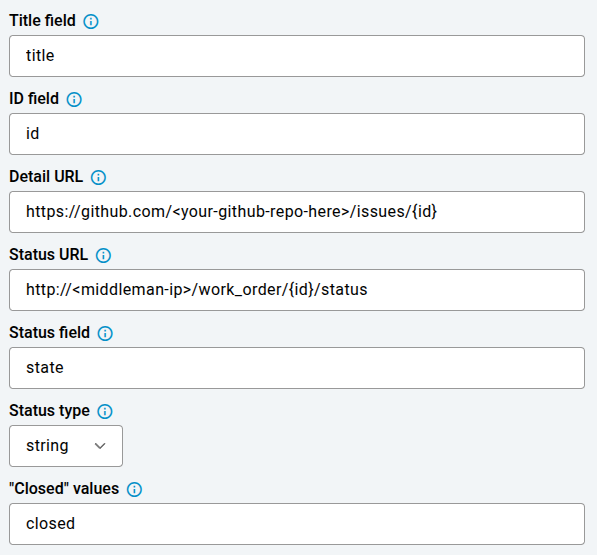
This example uses the following Orbit work order configuration:
Authentication
Work Order Spec
{
  "specs": {
    "body": {
      "spec": {
        "stringSpec": {
          "editable": true,
          "templateValue": "Found an anomaly during mission {anomaly.missionName}. See full anomaly here: \n\n{anomaly}",
          "isMultiline": true
        }
      },
      "uiInfo": {
        "displayName": "Description",
        "displayOrder": "2"
      }
    },
    "title": {
      "spec": {
        "stringSpec": {
          "editable": true,
          "templateValue": "Problem at {anomaly.actionName}"
        }
      },
      "uiInfo": {
        "displayName": "Title",
        "displayOrder": "1"
      }
    }
  }
}
Other Fields
Running the Example
To run the Flask server:
python git_example.py
The server will start on port 21605. You can interact with the API using curl or any HTTP client. This example should not be run in production environments.
API Endpoints
POST /work_order— Create a new work order (GitHub issue)JSON body should include
title,body
GET /work_order/<id>/status— Get details for a specific work order (GitHub issue)
Example Usage
Create a work order:
curl -X POST http://localhost:21605/work_order \
  -H "x-integration-secret: <your_secret>" \
  -H "Content-Type: application/json" \
  -d '{"title": "Test Work Order", "body": "This is a test."}'
Get status of a work order:
curl -X GET http://localhost:21605/work_order/1/status \
  -H "x-integration-secret: <your_secret>"
Common Problems
Ensure all required environment variables are set before running.
Your GitHub token must have permission to create issues in the target repository.
The integration secret must match the value sent in the
x-integration-secretheader from Orbit.If you see authentication errors, check your token and secret values.
Learn More
For more information on Orbit’s work order integration, see the Orbit Documentation or contact Boston Dynamics support.